AI automation without the surprises
Hand AI the work your team repeats.Approve what goes out.
Describe a weekly job in plain words. SynapseOrch turns it into steps you can read, runs them exactly as you approved, every time, and asks before anything goes out. Every plan has a hard limit, so the bill never surprises you.
Free plan, no card needed. Prefer your own servers? It’s open source.
Why teams switch
Built for the ways AI automation goes wrong.
- The path you approved, every run
“It worked for weeks. Then it improvised.”
SynapseOrch fixes the steps before a run starts. Every run stays on the path you approved, and takes a branch only where you drew one. If a step fails, the run stops and tells you why, in plain words.
- A bill that stops
“Our credits were gone in two days.”
Every run shows what each step cost, and every plan has a hard limit. When the month’s credits are used up, runs pause. You’re never billed past the plan you chose.
- An engine nobody can take away
“The tool we built on shut down.”
SynapseOrch is open source. The engine that runs your workflows on our cloud is the same one you can install on your own servers, so it can never be taken away, by anyone, us included.
See it work
What a week with SynapseOrch looks like.
Start the day with what needs you
Home opens on the approval waiting for your yes, then what ran, what failed and what’s coming up.
Shown in a demo workspace.
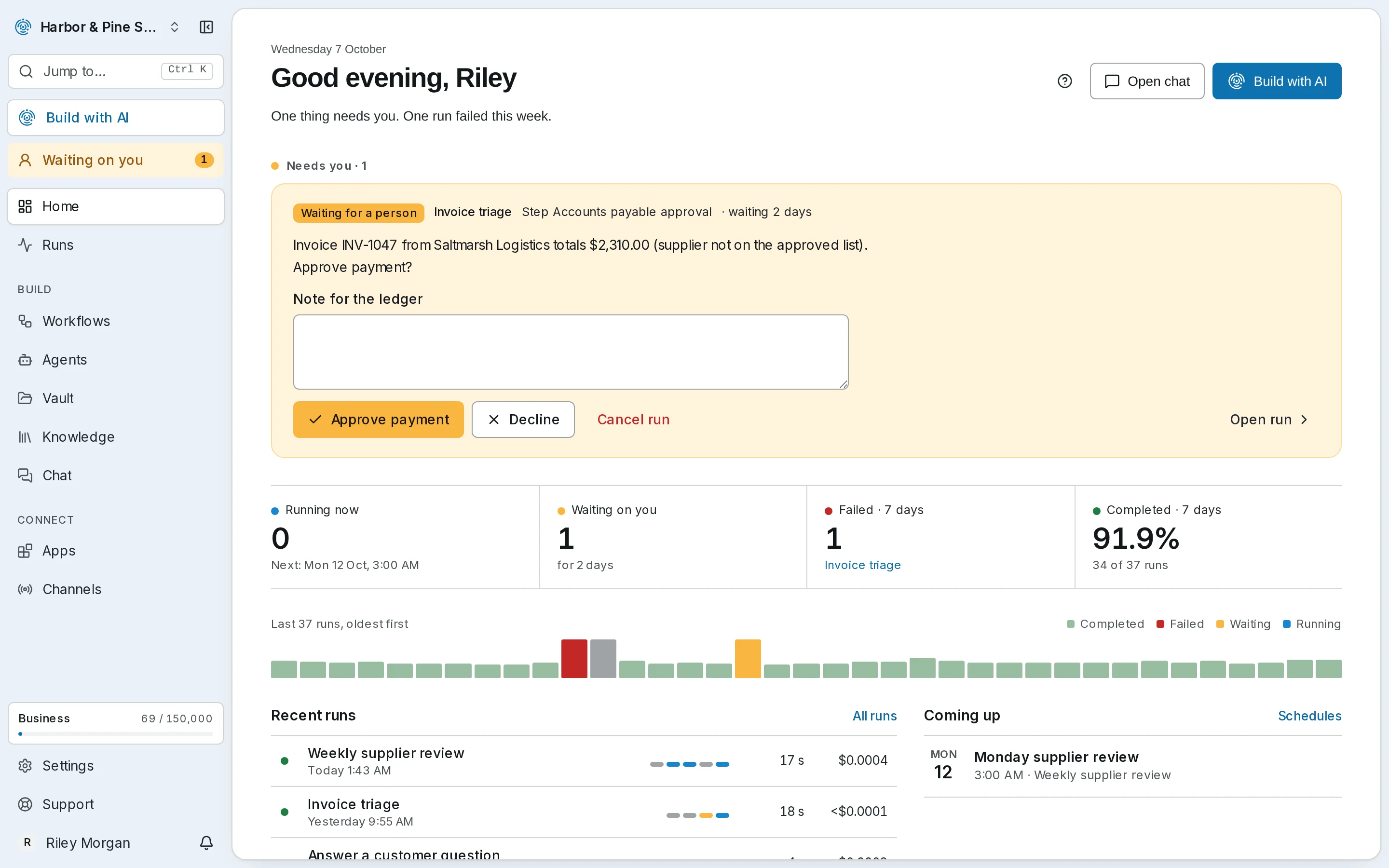
Start the day with what needs you
Home opens on the approval waiting for your yes, then what ran, what failed and what’s coming up.
Shown in a demo workspace.
Watch a run, step by step
Each step lights up as it runs, with the log beside it, so you see the work as it happens.
Shown in a demo workspace.
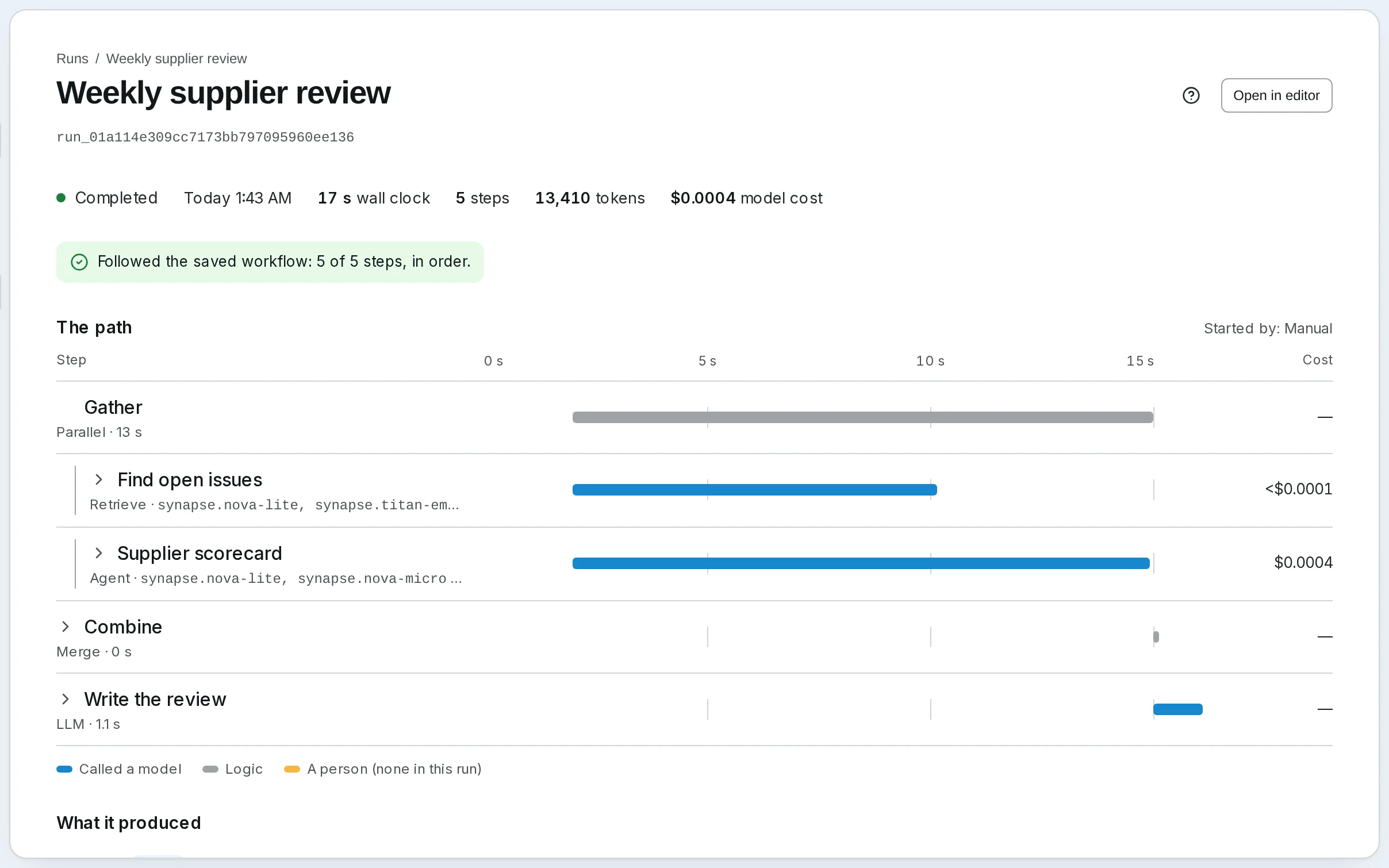
See what every step cost
Every run says whether it followed the plan, how long each step took, and what it cost.
Shown in a demo workspace.
Answers that show their source
Agents search your documents and quote the passage they used, so you can check every answer.
Shown in a demo workspace.
Put the agent on your website
The same agent answers visitors in a chat widget, in your colors, from the same documents.
Shown in a demo workspace.
Start from a template
Ready-made workflows for the work teams repeat. Add one, then make it yours.
Shown in a demo workspace.
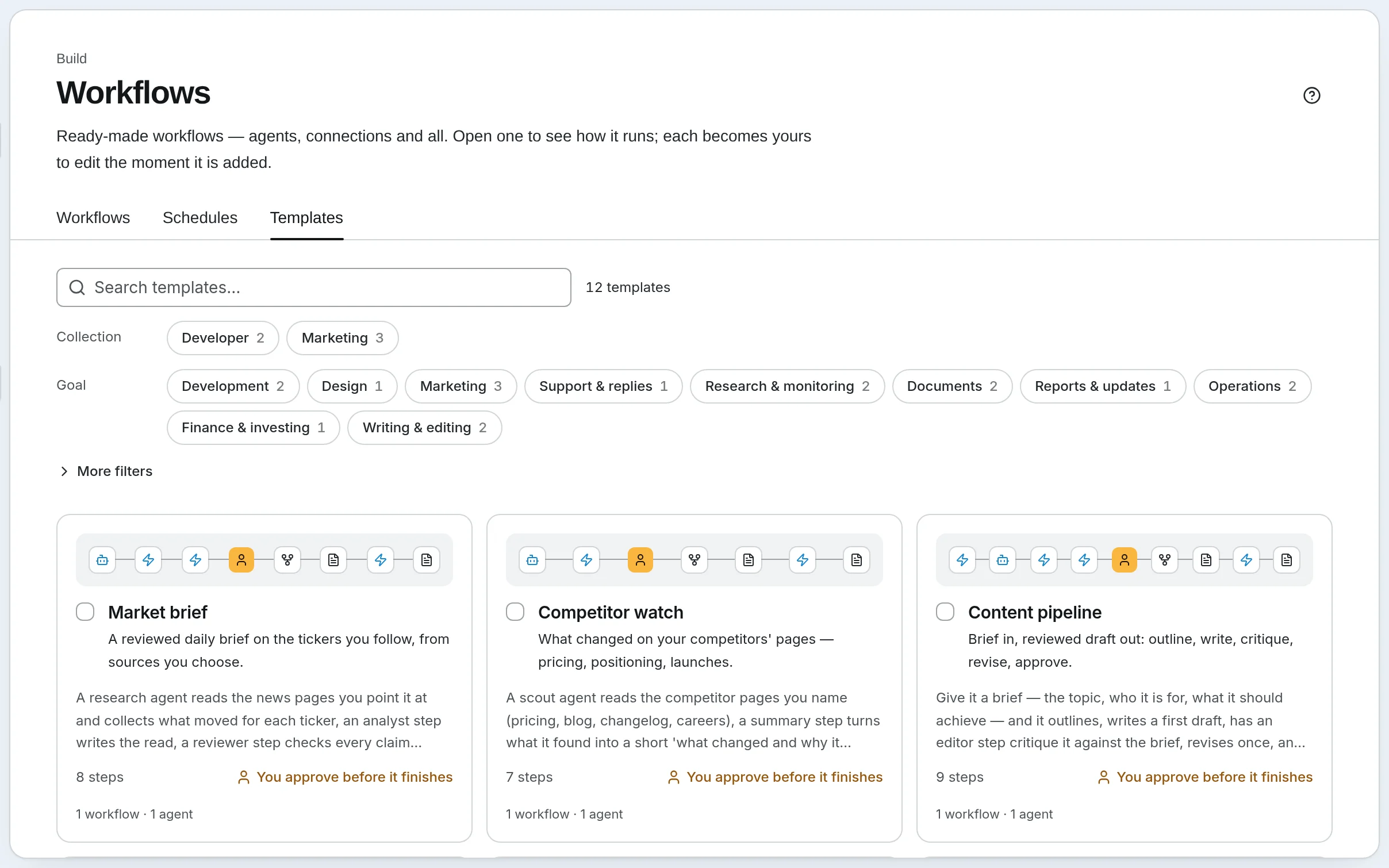
Templates
Start from work your team already does.
Twelve ready-made workflows to run on day one, each yours to change. Ten of them ask for your OK before anything is filed, sent or applied.
- Inbox triageWorks out of the boxClassify an incoming message, escalate the urgent ones, draft the reply.You approve it
- Weekly report to Google DocsNeeds Google WorkspaceTurn the week's notes into a report and file it as a Google Doc.You approve it
- Meeting notes to actionsWorks out of the boxRaw notes in — decisions, owners, due dates and a follow-up note out.No sign-off
- Document reviewWorks out of the boxSummary, obligations and risk flags for a contract or report, then your review.You approve it
Your sign-off
Nothing goes out without your yes.
Add a sign-off wherever work leaves the building: before an email is sent, a report is filed or a change is made. The run waits, for minutes or days, and waiting costs nothing. Answer in the app, in Telegram, or with one click in the email. The person who approves needs no paid seat.
- SynapseOrch7:02 AM
⏸ This week's supplier review is ready. Saltmarsh Logistics dropped to 6/10 on late deliveries. Send it to the ops team?
Reply here to answer.
- Riley Morgan7:06 AM
Yes, send it.
- SynapseOrch7:06 AM
Sent the review to ops@harborpine.example.
Connections
Works with what you already use.
- Google Workspace
- Telegram
- Jira
- GitHub
- Figma
- Your websitea chat widget
- Claude and ChatGPTthrough MCP
- Phone callsthrough Twilio
Plus more than 50 apps you connect by signing in, and any MCP server or API you already have. See integrations
What it costs
A bill you can predict.
Each step that does work costs one credit, a logic step a tenth, and waiting for you nothing. A 6-step weekly report comes to about 4 credits a run. When a plan’s credits are used up, runs pause: nothing is ever billed past it.
- Free
- $0/ mo
- 1,000 credits
- ≈ 240 runs
- Solo
- $19/ mo
- 5,000 credits
- ≈ 1,200 runs
- Team
- $99/ mo
- 25,000 credits
- ≈ 6,000 runs
- Growth
- $199/ mo
- 50,000 credits
- ≈ 12,100 runs
- Business
- $499/ mo
- 150,000 credits
- ≈ 36,500 runs
Runs of a 6-step workflow a month, at 4.1 credits each. Models are separate: $2 a month on every plan with no API key needed, then your own key or a prepaid balance.
See pricing- GatherNo model$0
- ScorecardNova Lite$0.0006
- Open issuesTitan Embed v2$0.0001
- Write reviewClaude Sonnet 4.5$0.0104
- ApproveA person$0
- Send to opsNo model$0
Where it runs
On our cloud, or on your servers.
Start on our cloud with nothing to install. Or run the same open-source engine yourself, with local models if your data has to stay in the building. Either way, it is the same engine.
- Nothing to install, and no API key needed
- Workspaces, roles, and viewers who never count as seats
- A free plan, no card needed
- Secrets are encrypted one by one and bound to your workspace.
- Our managed models never train on your prompts or outputs.
- Anyone can read the code that runs your workflows.
Getting it built
We’ll build your first workflow with you, free.
Bring the job that already runs every week. We set it up with you in your own workspace, at no charge, with the scope agreed in writing first. In return we ask for real use and blunt feedback. Open to the first 10 businesses.
Apply for a pilotStart with one workflow.
Pick the report, brief or review your team does every week. Set it up free today and watch the first run before you pay anything.
Free plan, no card needed.